Blog 2
Customize retention policies for contact recordings in Amazon Connect
by Mo Miah and Jack Tilson on 01 OCT 2025 in Advanced (300), Amazon Connect, Technical How-to | Permalink | Share
Introduction
Contact centers, particularly at Business Process Outsourcing (BPO) companies, operate multiple lines of business (LOB) with diverse regulatory or contractual requirements for contact recording retention.
Failure to comply with industry regulations or contractual obligations can result in fines, legal disputes, and reputational damage. Conversely, retaining contact recordings beyond the required period can lead to unnecessary storage costs and potential data privacy concerns.
Organizations must meet their compliance obligations while optimizing operational costs.
In this blog post, you will learn how you can apply multiple retention policies for contact recordings across LOBs within a single Amazon Connect instance.
Solution overview
Amazon Connect provides native contact recording capabilities, enabling customers to record conversations between their agents and customers securely. These recordings are stored in an Amazon S3 bucket created specifically for your instance. Amazon S3 Lifecycle configuration can manage the lifecycle of these recordings. This enables you to define expiration rules for objects that automatically delete expired recordings in Amazon S3 on your behalf.
In this solution, a custom contact attribute within the Amazon Connect Flow specifies the desired retention period for each contact. This contact attribute is then streamed to Amazon Kinesis, along with the rest of the Contact record, invoking an AWS Lambda function. The Lambda function uses the object tagging feature of Amazon S3 to tag the recording objects based on the specified contact attribute value. Consequently, the recording objects are set to expire according to their respective tags, following the predefined S3 Lifecycle rules configured for the bucket.
With this approach, you can implement customized retention policies for contact recordings to comply with data retention regulations, minimize storage costs, and optimize resource utilization.
High Level Architecture Diagram
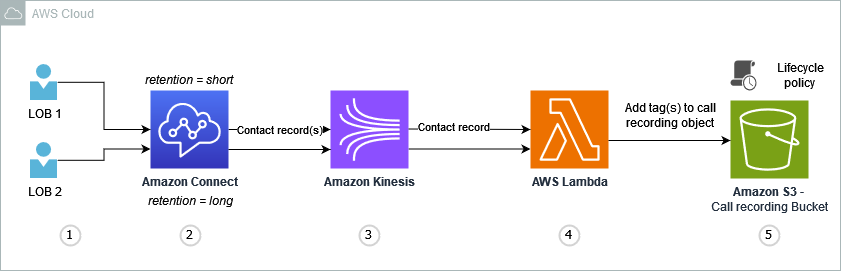
Image 1 – Architecture diagram
Detailed flow steps
- Contact arrives on Amazon Connect on a specific line of business (LOB).
- A contact attribute
retentionis attached to the contact within the contact flow—the attribute value (short, long) assigned depending on the LOB. - Amazon Kinesis streams the contact record out to Amazon S3.
- An AWS Lambda function is invoked as part of the transfer to Amazon S3. This function updates the Amazon S3 Lifecycle policy (using object tagging) for the object based on the
retentionattribute (short, long) of the contact record. - The recording in Amazon S3 is set to expire based on the respective lifecycle policy.
During this blog, we will deploy:
- A CloudFormation template that provides:
- An Amazon Connect Contact Flow for demonstration and testing of the solution.
- An Amazon Kinesis Data Stream to act as a carrier of Contact Trace Record (CTR) data out of Amazon Connect.
- Two AWS Lambda functions responsible for configuring Amazon S3 Lifecycle Policies and tagging new recordings according to the relevant retention period.
This architecture will fit into an existing Amazon Connect instance of your choice, and corresponding Amazon S3 contact recording bucket.
Prerequisites
Validate that you have the relevant permissions to perform the tasks in this guide. If you encounter access rights issues, contact your AWS administrator to align the required permissions to your role.
As an outline, the following actions should be available to you within the AWS account where your Amazon Connect instance is deployed:
- CloudFormation: Launching and deleting stacks.
- Amazon Connect: Creating and configuring contact follows, and accessing instances.
- IAM: Creating and viewing IAM roles.
- Lambda: Creating, editing, configuring event sources for, and deploying functions.
- Kinesis: Creating Kinesis Data Streams.
Walkthrough
You can benefit from this guide irrespective of whether you have an Amazon Connect instance created already, or are getting started for the first time.
The following steps assume that you have an AWS account and an existing Amazon Connect instance. To create a new Amazon Connect instance, follow the steps in Lab 1 of the Getting Started with Amazon Connect Workshop. If you need an AWS account, follow the prerequisite steps.
Launch the CloudFormation template
A CloudFormation template can be written in JSON or YAML format, and represents a means of Infrastructure as Code (IaC) on AWS. The CloudFormation template for this guide can be downloaded by clicking the following button.
[Button to download CloudFormation template]
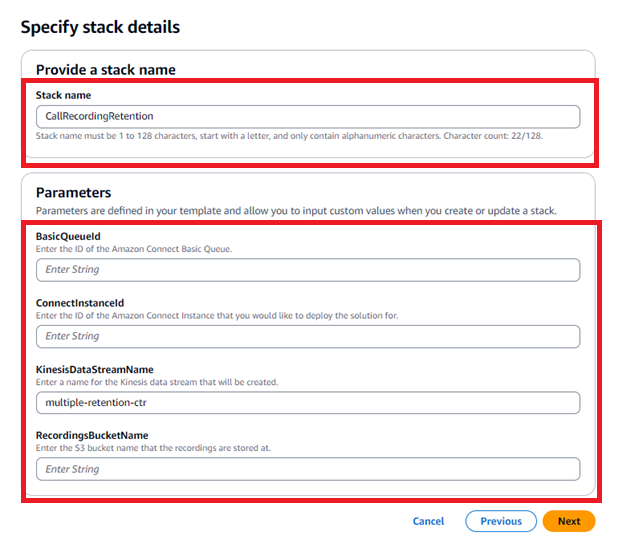
You will be greeted by a form from the CloudFormation service. Provide the Stack name with a descriptive name. These parameters align the template to your specific Amazon Connect instance and recordings bucket.
Step 1: Identify
We will capture and note the information required for the next step.
a) BasicQueueId
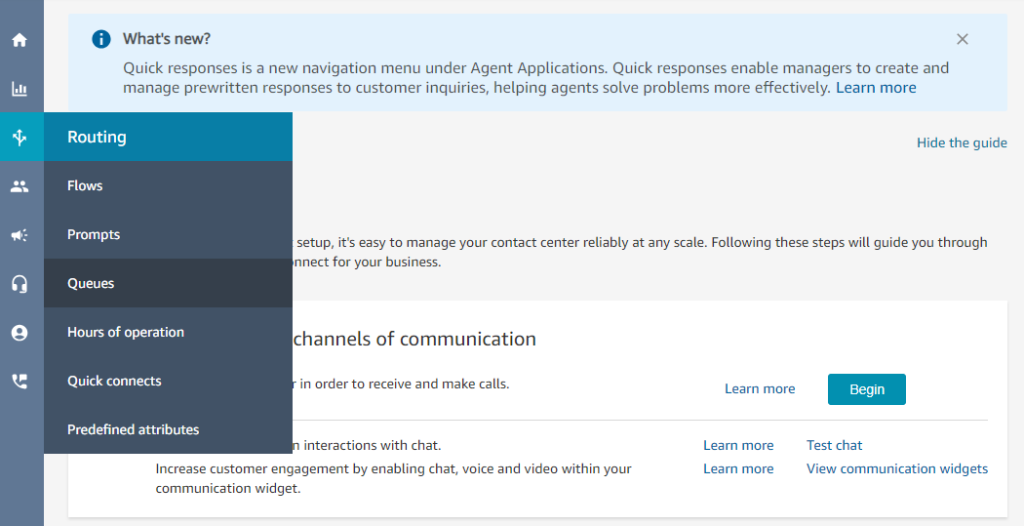
- Navigate to the Amazon Connect Console as an administrator, or user with appropriate security profile configuration for viewing queues and contact flows.
- Choose Queues under the Routing
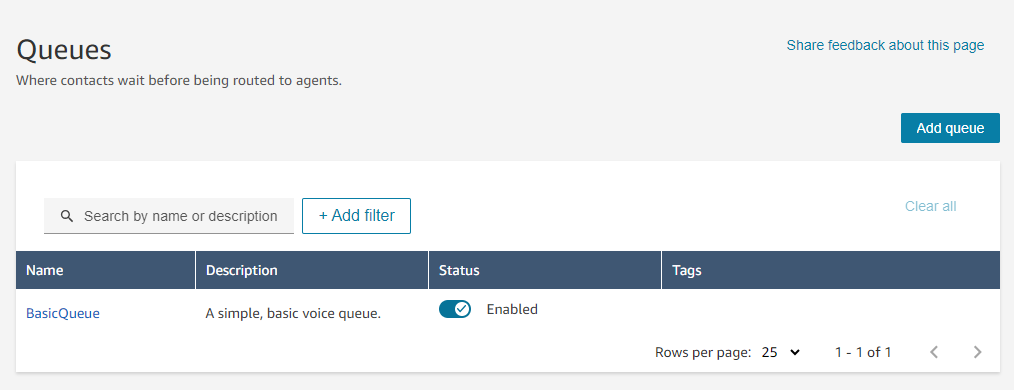
- Select BasicQueue from the list of queues presented.
- Choose Show additional queue information.
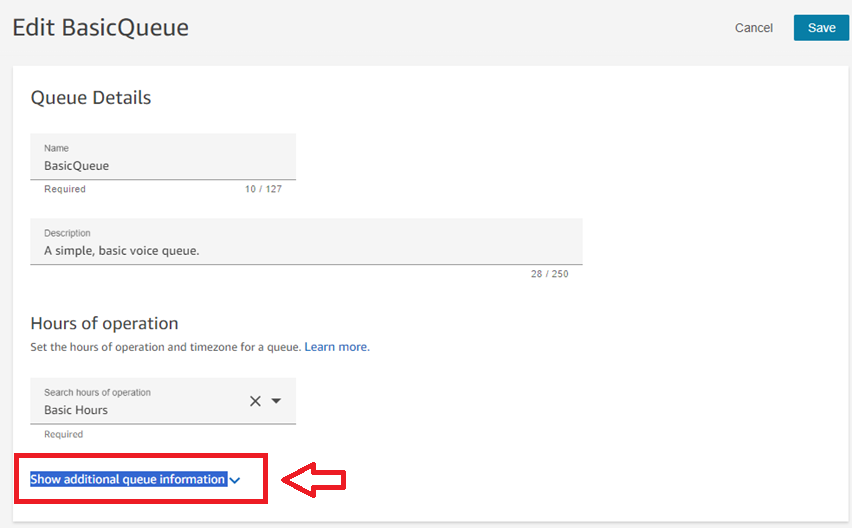
- Capture the Queue ID from the last token of the ARN.

- Take a note of this.
b) ConnectInstanceID
- From the same ARN, we can infer the Connect Instance ID. From the preceding screen, we can focus on the instance portion of the ARN.
You can also capture the Connect Instance ARN from the Overview page for the Amazon Connect instance page in the AWS Management Console.

- Take a note of this or input it into the
ConnectInstanceIdfield in your other tab containing the CloudFormation template parameter input form.
c) KinesisDataStreamName
- You may leave this as its prepopulated name of “multiple-retention-ctr”, or change the name per your preference.
d) RecordingBucketName
- Select your Amazon Connect instance from the Amazon Connect service page of the AWS Management Console
- Click on the instance alias
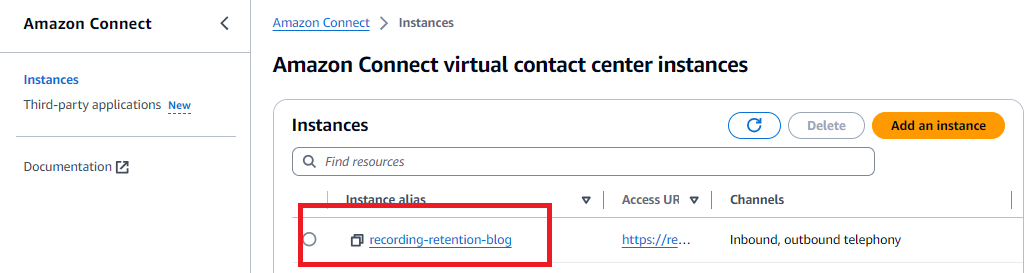
- Access the Data storage section of the navigation from the Amazon Connect service page of the AWS Management Console. You can identify the name of the S3 bucket here. While the full path is provided, you just need the bucket name.
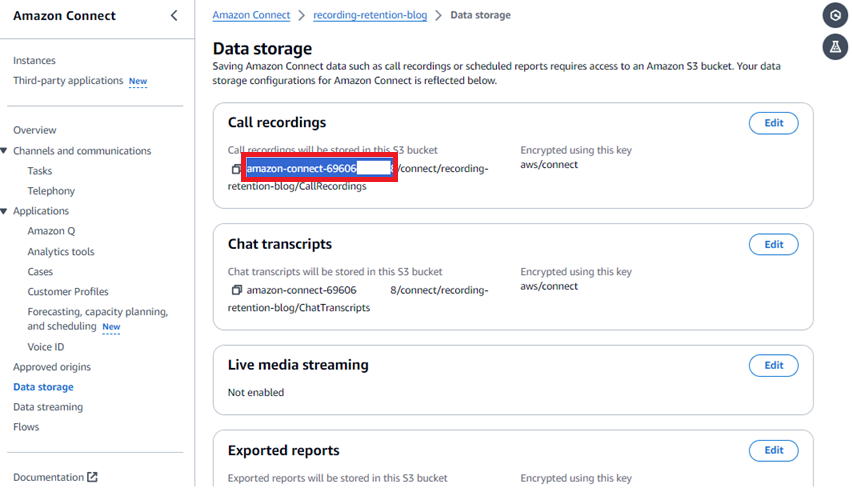
- Take a note of this or input it into the
RecordingBucketNamefield in your other tab containing the CloudFormation template parameter input form.
Step 2: Deploy the solution
Upon gathering all preceding items, populate the CloudFormation template parameter form.
- Complete the template before proceeding.
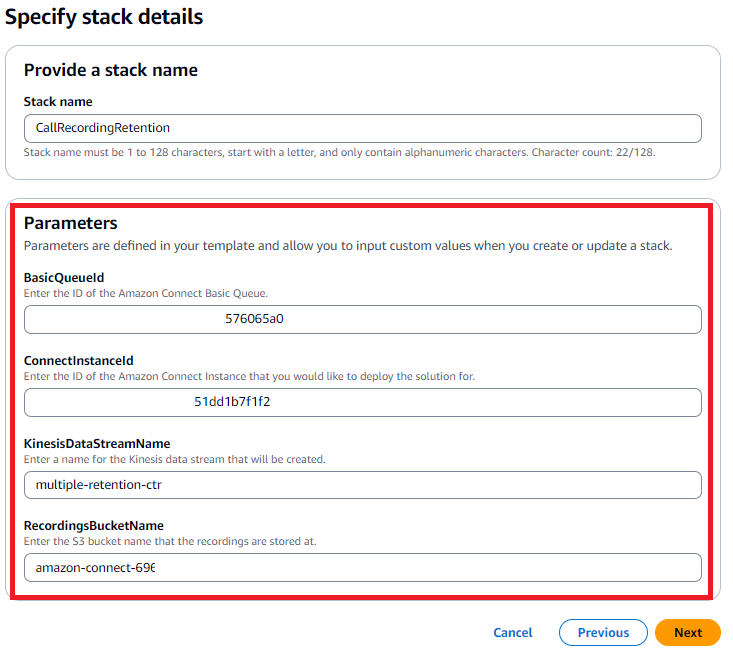
- Choose Next to continue.
- On the Configure stack options page that follows, leave all settings as default (unless you know that you would like to change them) and choose Next
- Review the final details and parameters on the Review and create page. As before, you may leave all of the settings as their default values, except for the acknowledgement at the end of the page.
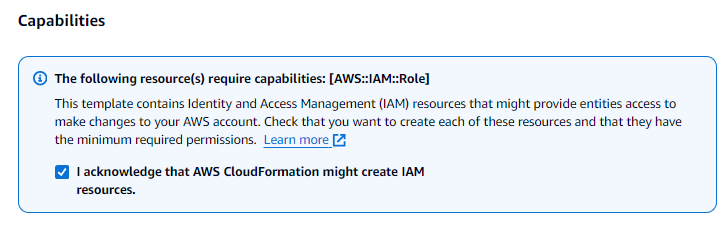
- Choose Submit to start the launch process.
- This will initiate the launch of the template. You will see a CREATE_COMPLETE status message under stacks. You can additionally visit the Events tab and Resources tab to review the resources that have been launched by the template.
Step 3: Enable data streaming from Amazon Connect
NOTE: Amazon Connect supports sending CTR data to a single Kinesis Data Stream only. If you are already sending CTR data to a Kinesis Data Stream, you may update the event trigger configuration within the
TagS3ObjectLambda function to be invoked when streaming records arrive in your incumbent Kinesis Data Stream. This avoids using the stream named “multiple-retention-ctr” from the template. This will make the Lambda function another consumer of your existing stream, without disrupting established workloads reliant upon Kinesis streams. Following this, please proceed directly to the Usage Validation section.
If you have not configured CTR streaming from the instance, continue along this section to do so.
The Amazon Connect Instance should be configured to send Contact Trace Records (CTR) data to the “multiple-retention-ctr” Kinesis Data Stream. This can be achieved by visiting the “Data streaming” section of the Amazon Connect Instance configuration screen in the AWS Management Console.
There is no additional configuration needed at the Contact Flow or Queue level to make this streaming behavior occur. It is an instance-level setting.
- Access the Data streaming section of the navigation from the Amazon Connect service page of the AWS Management Console. Notice whether Data streaming is enabled.
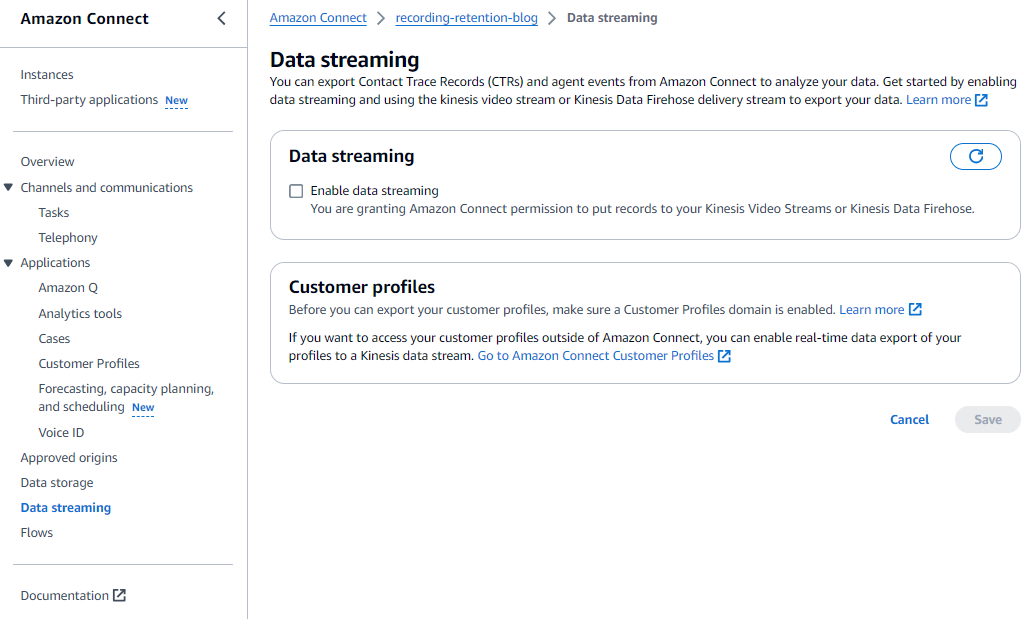
- Select the check box to enable it, and select the appropriate Kinesis data stream.
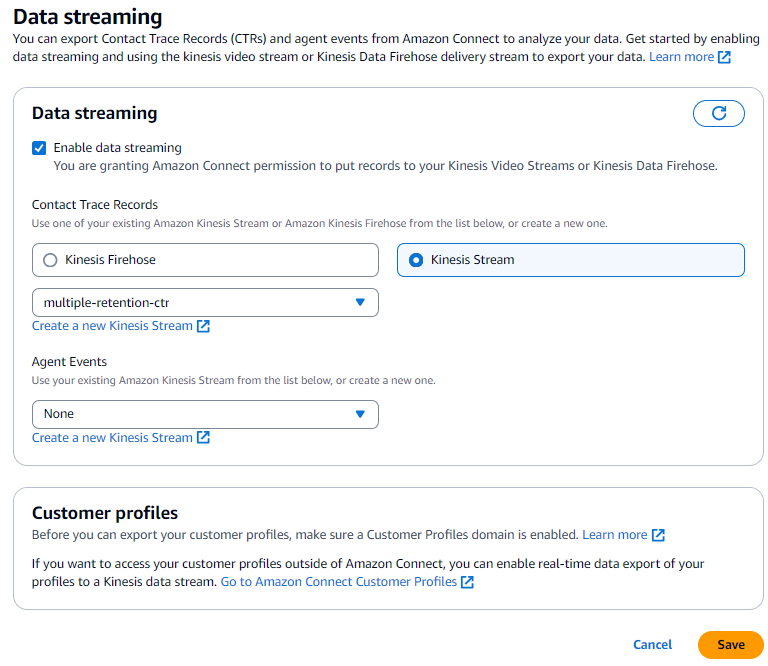
- Choose Save.
Contact Flow (changes made – This detail is informational and no further action is required)
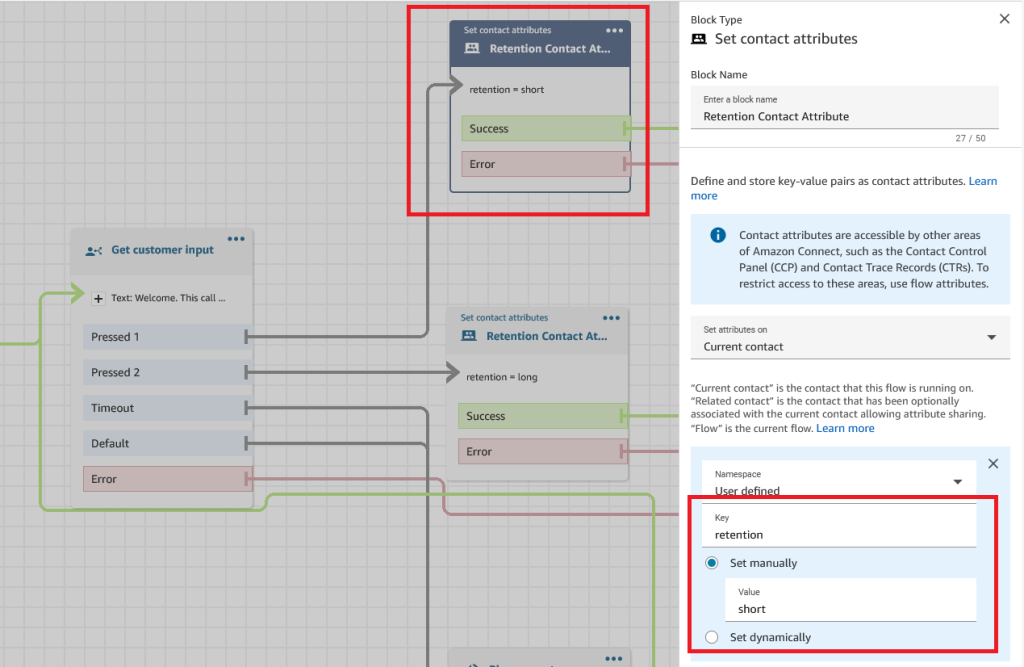
The following image shows the contact attribute assignment for contacts (in the following example, callers that have pressed option 1 are assigned short retention).
 \
\
Lambda Code Snippets
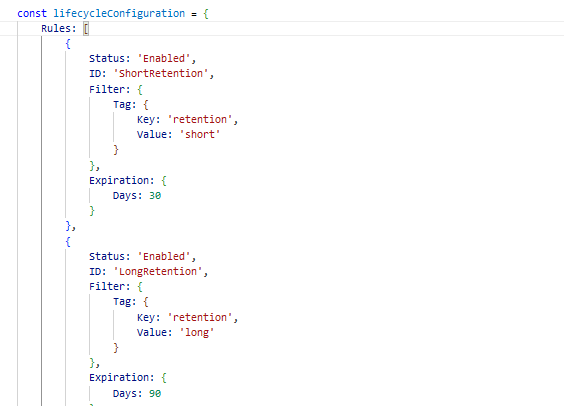
 \
\
This code extracts the value of the retention attribute and creates a tag with key ‘retention’ and value obtained from ‘retentionvalue’, applies the tag to the Amazon S3 Object using ‘PutObjectTagging’ API.
At this stage, the solution should be ready for you to use and apply to your contact flows by setting the retention contact attribute where desired in your implementation.
Usage validation
Now that we have validated the deployment and understood each component, we can now try a test contact.
Step 1: Assign a Phone Number to the “Configure multiple retention policies” flow
This step associates the Contact Flow deployed by the CloudFormation template to the phone number for testing the solution.
- Navigate to the Amazon Connect Console as an administrator, or user with appropriate security profile configuration for viewing queues and contact flows and configuring phone numbers.
- Navigate to Phone numbers under the Channels side-bar section.
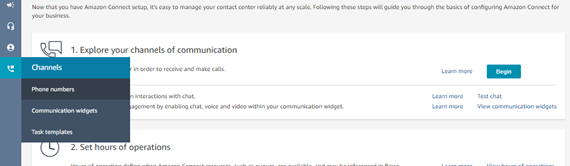
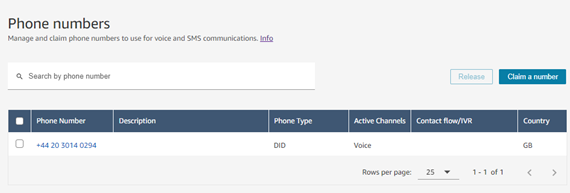
- Select the desired phone number for testing. If you do not have a phone number available, proceed to via the Claim a number button.
- Select the Configure multiple retention policies contact flow.
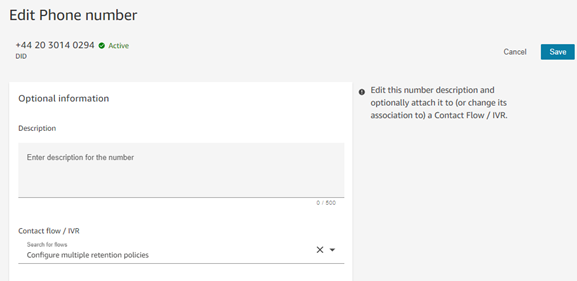
- Select Save to persist the changes.
Step 2: Call the phone number
Try it out – you can press 1 or 2 to set the retention length. In this scenario, we pressed 1 for a short retention policy. The contact will then come through to the BasicQueue within Amazon Connect.
- Dial the number from a phone, select the desired option.
- From the Contact Control Panel (CCP) or Agent Workspace, answer the incoming contact for a few seconds.
- Disconnect the contact.
Step 3: Check Amazon S3 recording object tags
Now that we have disconnected the contact, we can inspect the Amazon S3 object to ensure that it is showing the expected tags. Please note, it may take a few minutes for the tags to be reflected.
- Navigate to the S3 bucket where your recordings are stored, and navigate through the object tree to identify the most recent recording.
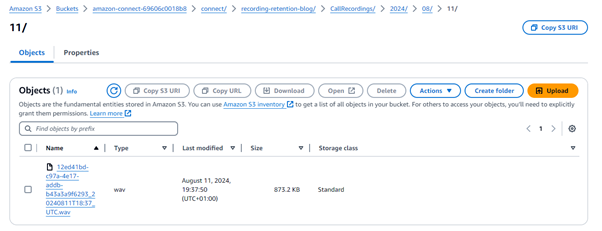
- Select the recording file from within Amazon S3. Scroll down within the Properties tab, and the
retentiontag will be present, with its value either being “long” or “short” depending on the option selected (and therefore contact attribute set) during the test contact. This indicates a successful test. The contact attribute was set correctly, and the CTR record streamed to the Lambda function that led to the contact recording being tagged appropriately. The S3 Lifecycle Policy will now delete the recording at the right time without user intervention. For more information on S3 Lifecycle Policies, click here.
Note: It is not necessary to select the recording retention policy via the IVR. Each flow can be configured via the Contact Flow designer to set the appropriate contact attribute silently in the background, using the Set Contact Attributes block.
Clean up
To roll back the CloudFormation template deployment, there are two aspects. This will clean up the resources created during this guide.
Step 1: Delete the CloudFormation stack
Navigate to the CloudFormation template deployed as part of this blog, and delete the stack. This step should successfully delete the IAM, Lambda, and Kinesis Data Streams resources. The only exception to this should be the example Contact Flow, which we will tackle in the next step.
Step 2: Archive the demonstration Amazon Connect contact flow
To minimize the risk of accidental disruption to the Contact Centre, it is not possible to delete Contact Flows from CloudFormation. To remove this, we can simply step into the Amazon Connect instance with a user holding the appropriate Security Profile, and archive the flow.
The Kinesis Stream will automatically unassign itself from the Data streaming configuration of the Amazon Connect Instance upon deletion of that Kinesis Stream in the previous step.
There are no charges associated with storing Contact Flows, thus archiving will not leave any residual cost over deletion.
At this stage, all resources involved in the preceding activities (except any contact recordings generated) will be cleaned up.
Conclusion
Implementing multiple call contact recording retention policies within a single Amazon Connect instance offers significant business benefits. By leveraging Amazon Connect and AWS Services, organizations can achieve a balance between compliance and cost-effectiveness.
This approach streamlines operations, ensures data privacy, and provides the flexibility to adapt to evolving business requirements. The result is a seamless, customized solution that optimizes costs and maintains regulatory compliance, all within a single, scalable platform.
Learn more
- New to Amazon Connect? You can navigate to our Getting started with Amazon Connect User Guide.
- Eager to hear more about the latest Amazon Connect capabilities? Watch on-demand webinars, how-to, and demos in our Amazon Connect Enablement YouTube channel.
- Curious to try our Amazon Connect hands-on Workshops? Navigate the Amazon Connect Workshops we curated for you.
- Curious about upcoming Amazon Connect events? Check out the Customer Experience Workshops & Events and register for an upcoming event.